Nobody knows where your application stands? In five business days, you will.
The previous developer is gone, the documentation is missing, or the app was built with AI and nobody knows exactly what’s inside. And you’re expected to decide: keep it running, modernize or rebuild. Without an overview, every quote is a shot in the dark, and you still have to stand behind the decision. The Takeover Assessment is the technical review of your web application at a fixed price, whether PHP, JavaScript or built with AI: technology, risks, operations, immediate actions and options in one report, no matter who you continue with afterward.
What’s in the Takeover Assessment report: 15 chapters.
The report from Unique-P’s Takeover Assessment runs about ten pages, written for management and technical staff alike. The most important points come first on one page, followed by the details a developer needs to get started right away.
01
Management summary
The result, the three most important risks and the recommendation on a single page.
02
Takeover readiness
Can the system be taken over safely? A rating with reasons.
03
Technology inventory
Language, framework or CMS, packages, database, front end and platform accounts, each with its version.
Every technology has its own weak spots. That’s why the Takeover Assessment has a review module for each stack.
In Unique-P’s Takeover Assessment, a review module for your technology is added to the core program, because a WordPress website becomes vulnerable in different places than a Next.js app or a Laravel portal. The report’s 15 chapters stay the same, no matter what your application runs on, and the module’s findings go into the same chapters. If your application consists of several parts, such as a Laravel back end with a Vue front end, both modules apply.
In PHP applications, the pressure usually comes from the hosting provider: it switches off the old PHP version, and the framework, packages and database have to move along at the same time. The PHP review module checks:
PHP, framework and CMS version with end of support, plus your hosting provider’s plans
Packages and extensions that are outdated, abandoned or carry known vulnerabilities
Unsafe database queries, open directories, unprotected uploads, debug mode on the live system
What runs in the background: cron jobs, queues, email delivery, imports
Node.js, React and Next.js, Vue and Nuxt, Angular, Svelte
JavaScript and TypeScript applications age faster than PHP applications: versions lose support sooner, and even a small app depends on hundreds of packages. The JavaScript and TypeScript review module checks:
Node.js and framework version with end of support, and whether known vulnerabilities like those in Next.js and React are closed
Packages that are compromised, abandoned or not even real, and whether versions are pinned
What ends up in the browser: keys in the shipped JavaScript, checks only in the browser instead of on the server
Operations: whether the app can be rebuilt the same way at any time, and where settings, secrets and functions live
Lovable, Bolt, v0, Replit, Base44, Cursor, Claude Code, Codex and others
An app built with AI often already runs with real customers before anyone has checked who may see which data and who owns the accounts. The review module for apps built with AI checks:
Ownership: repository, Supabase or Firebase project, domain, workspace and Stripe account
Whether the app can be built and run outside the platform
Access rules for every table and every file storage, whether the login is checked on the server, and whether a changed ID shows other people’s records
Keys in the shipped code, in old versions in the repository or in platform chats; whether test and live are separated and what the AI agent is allowed to do with live data
Backups with tested restores, data location, ongoing usage costs
If pages load slowly, the admin gets sluggish or the server costs more than necessary, for example because of slow database queries, a missing cache or bots that bypass the cache, the Takeover Assessment report flags it as a warning sign. Measuring and fixing it comes afterward, if you want: Make your application faster and cheaper to run.
Open database rules in Supabase and Firebase go unnoticed. Until someone takes a look.
In apps on Supabase or Firebase, the protection of your data lives in access rules: Row Level Security in Supabase, Security Rules in Firebase. If a rule is missing or too permissive, anyone with the public key from the browser can read customer data without logging in. The app works perfectly all the while, which is why nobody notices.
If your app built with AI should have someone to carry it forward after the assessment: AI-built app takeover.
Standard in the assessment: read-only
For Supabase and Firebase apps, Unique-P’s Takeover Assessment queries the live rules for every table and every file storage with read access and compares them with the code: who may read, who may write, what works without a login? This changes nothing in your app and puts no load on it.
Optional: access test with two test accounts
The optional access test with two test accounts runs only with your written permission. Account A tries to read account B’s data, and also without a login using the public key. Read-only, never writing or deleting, and where possible on a staging copy instead of the live app.
No penetration test: no attack on the whole system, no scanners that generate load, no exploiting of vulnerabilities found, no social engineering.
What does a finding in the Takeover Assessment sound like?
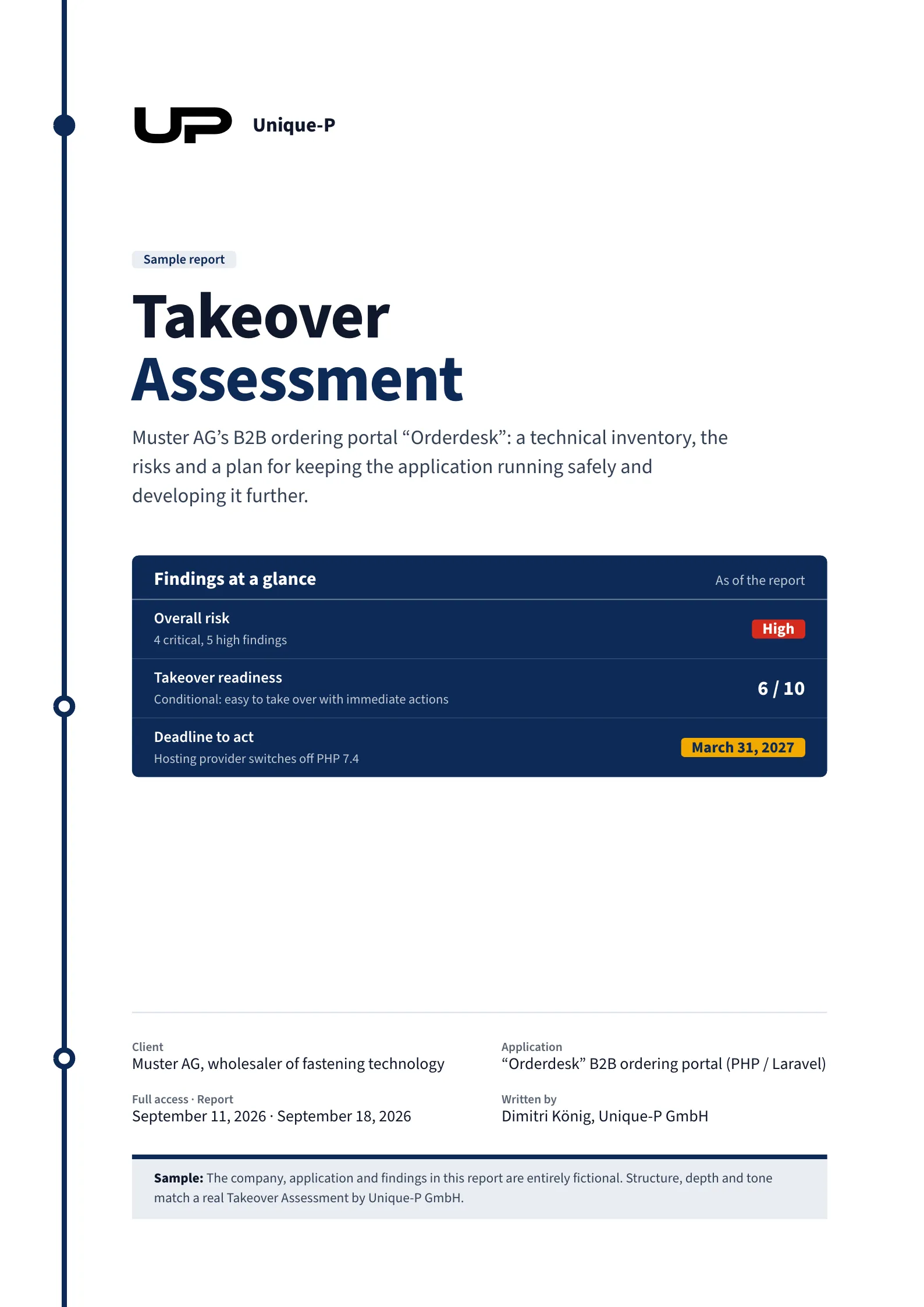
The management summary comes from the sample Takeover Assessment report for a fictional company with a Laravel ordering platform. Structure and depth match a real report. The full report is available as a PDF. For a JavaScript app, a WordPress website or an app built with AI, the structure is the same, and the findings come from the matching review module.
The application can be taken over. What’s critical isn’t the code but its surroundings.
The sample company’s three most important risks
1Downtime from April 2027: without an upgrade, the application stops running once the hosting provider switches off PHP 7.4. The upgrade affects the framework, packages and database at the same time.
2Data loss in an outage: there are only the hosting provider’s database backups (7 days). Files are not backed up, and a restore has never been tested.
3Publicly accessible customer data: CSV exports with customer and order data sit in a publicly reachable directory. This can be fixed within a day.
Recommendation: stabilize and modernize step by step, in three stages at a fixed price. A rebuild would cost several times as much and wouldn’t be finished before the shutdown.
From Takeover Check to decision: how the Takeover Assessment works.
013 minutes
Takeover Check
The Takeover Check asks 16 questions online. You see right away whether your application is a fit for a Takeover Assessment and what’s still missing.
0230 minutes
Call and fixed price
In the 30-minute call, we clarify the scope and goal of the assessment, and you get a quote with a fixed price.
03approx. 1 hour
Access
For the Takeover Assessment, you provide access to code, hosting or platform accounts and database, plus about an hour of conversation with someone who knows the workflows.
045 business days
Analysis
In the analysis phase of the Takeover Assessment, code, infrastructure, dependencies, security and operations are put to the test. You get the report within 5 business days of full access.
0560 minutes
Review meeting
In the review meeting of about 60 minutes, you go through the report with the person who wrote it: you ask questions and get every option explained.
06up to you
Decision
After the Takeover Assessment, you decide how to proceed and with whom. The report is yours.
What you contribute to the Takeover Assessment
access to the repository or source code
access to hosting or the server, or, for apps without their own server, to the platform accounts (e.g., Vercel, Supabase, Firebase)
database access or a recent dump
about an hour with someone who knows the workflows
existing documentation, if there is any
You don’t need to know the rest.
What the Takeover Assessment is not
No repair. The Takeover Assessment only analyzes. Fixes come afterward, as a separate stage at a fixed price.
No penetration test. The Takeover Assessment reviews read-only and attacks nothing: no attack on the whole system, no scanners that generate load, no exploiting of vulnerabilities found, no social engineering. You learn where the security warning signs are.
No legal advice. Contracts and rights to the code are not part of the Takeover Assessment. The review covers the application itself.
Takeover Assessment or code audit?
A Takeover Assessment and a code audit both look at existing software, but they answer different questions. Once you know which question you have, you know what you need.
How the Takeover Assessment differs from a code audit
Criterion
Takeover Assessment
Code audit
Key question
Can the application be taken over and kept running safely, and what needs to happen first?
How well is the code written?
Looks at
The code line by line with the right tools, plus infrastructure, dependencies, security warning signs, operations and knowledge risk
The source code: structure, quality, tests and sources of errors
Result
Report with risk matrix, immediate actions, options and an implementation proposal at a fixed price
Findings in the code with recommendations
Intended for
Management and technical staff alike
The development team
The Takeover Assessment reviews the code line by line, with the right tools. Contracts and finances aren’t part of it.
Takeover Assessment: not only when the developer is gone.
A Takeover Assessment also fits when nobody is gone, but a decision is coming up. The assessment stays the same, with the same report at a fixed price. Only the question behind it is different.
Second opinion on a quote for a rebuild
There’s a quote for a rebuild on the table, and you can’t judge whether it’s really necessary. Unique-P’s Takeover Assessment shows the state of your existing application and compares the options: keep it running, modernize step by step, replace parts or rebuild. That gives you a second opinion based on the code, not on a sales offer.
To be upfront: I also build new applications. That’s why the Takeover Assessment report justifies every recommendation in a way you can verify with any other provider.
Four paths after the Takeover Assessment, one fits.
After the Takeover Assessment, four paths are open: keep it running, modernize step by step, replace parts or migrate completely. The analysis decides which path makes sense. The trade-offs are covered in detail in the article Modernize or rebuild?
Frequently asked questions about the Takeover Assessment.
What is a Takeover Assessment?
A Takeover Assessment is a technical review of an existing web application before a takeover. It shows which technology is in use, which risks exist, how the application is operated and which measures are urgent. At Unique-P, the result is a report with a risk matrix, immediate actions, options and an implementation proposal at a fixed price.
What does the Takeover Assessment cost?
Unique-P’s Takeover Assessment has a fixed price you know before the start. The price depends on the size and complexity of the application and is set after the Takeover Check and a short call. The Takeover Check itself is free.
How long does the Takeover Assessment take?
You get the report from Unique-P’s Takeover Assessment within five business days of full access to code, hosting or platform accounts and database. Then you have about 60 minutes to go through it together and ask all your questions.
Do you also review JavaScript apps, WordPress or apps built with AI?
Yes, Unique-P’s Takeover Assessment also reviews JavaScript apps, WordPress and apps built with AI. The core program and the report are the same, plus the review module for your stack: PHP, JavaScript and TypeScript (such as Node.js, Next.js, Vue or Nuxt), WordPress with plugins and store, or an app from Lovable, Bolt, v0, Replit, Base44, Cursor, Claude Code, Codex or another AI tool. If your application consists of several parts, such as a Laravel back end with a Vue front end, both modules apply.
Do I have to continue working with you after the assessment?
No, after the Takeover Assessment you don’t have to continue with Unique-P. The report is yours and is written so that another developer or agency can work with it too. You’re free to decide who you continue with.
Is the Takeover Assessment a code audit?
The Takeover Assessment includes a code audit and goes further. The code is reviewed line by line with the right tools, plus infrastructure, dependencies, operations and knowledge risk. The result is a basis for decisions with immediate actions and options, not just a list of code findings.
Is the Takeover Assessment a security audit?
Unique-P’s Takeover Assessment is not a security audit in the sense of a penetration test. It uncovers security warning signs, such as outdated versions, open directories, unsafe database queries, keys in the shipped JavaScript or overly permissive access rules. The review is read-only: no attack on the whole system, no scanners that generate load, no exploiting of vulnerabilities found, no social engineering. If you need a targeted attack test, you get a recommendation for specialized providers. If your main concern is security and operations before a launch, the Go-Live Check with Security Audit is the better fit: it goes deeper there and includes a re-check after the fixes.
How do you check the access rules of our Supabase or Firebase app?
The Takeover Assessment checks the access rules of a Supabase or Firebase app read-only by default: the live rules for every table and every file storage (Row Level Security in Supabase, Security Rules in Firebase) are queried with read access and compared with the code. That changes nothing and puts no load on the app. Optionally, and only with your written permission, an access test with two test accounts is added: account A tries to read account B’s data, and also without a login using the public key. This too is read-only and, where possible, runs on a staging copy.
If the application is already down, Unique-P starts with the emergency fix: restore operations, fix the cause, write a status report. The Takeover Assessment follows as soon as the application runs reliably again.